Optimising your Google Business Profile means working on the only page of your business that Google displays before your website. When a customer searches for "plumber near me" or "hairdresser Bristol", they see three profiles in the local pack, and they call one of the three. Your website comes later, often too late.
The problem is that the available advice on this topic mixes official guidelines, forum recipes, and statistics copied and pasted over the last ten years. People fill in fields at random, stuff the business name with keywords, and sometimes end up with a restricted profile.
This article tackles the subject the other way around: first, what Google actually documents about local ranking, and then the ten levers you control, in the order they produce an effect, along with the mistakes that cancel everything else out.
💡 The essentials in 30 seconds
- The primary category carries more weight than all the keywords added elsewhere on the profile.
- Google ranks profiles based on three criteria: relevance, distance, prominence. You control two of them.
- Every field left blank is a missing signal, not a cosmetic detail.
- Reviews and their replies build prominence faster than posts.
- Putting keywords in your business name exposes you to profile suspension.
- Twenty minutes a week beats a full day of optimisation once a year.
🔍 What Google actually looks at to rank a profile
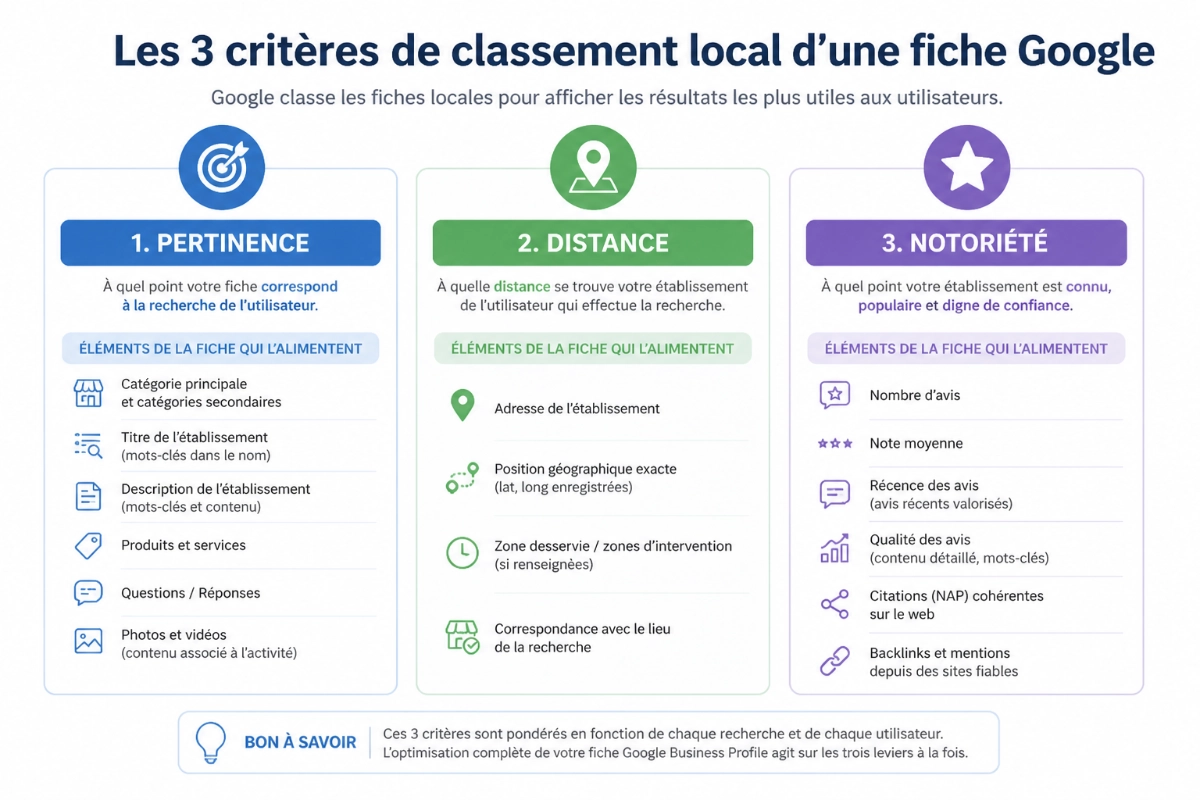
There is no need to guess: Google publishes its local ranking factors in its Help Centre, and there are three of them.
- Relevance: how well your profile matches the search query. Google specifies that complete and detailed business information helps it better understand your business and match your profile to relevant searches.
- Distance: how far your business is from the location term used in a search, or from the user's actual location.
- Prominence: how well known a business is. Famous places naturally rank higher in local search results.
The practical consequence is simple. Distance cannot be optimised: you are not going to move premises to gain two spots on Maps. Therefore, everything you do on your profile serves the other two criteria. Completeness and accuracy feed relevance; reviews, mentions of your business elsewhere on the web, and actual activity around the listing feed prominence.
This is also why no tool and no agency can guarantee a position. What can be managed is the compliance and completeness of the profile. The position is simply the outcome.
ℹ️ Good to know
If you visit or deliver to customers directly rather than having them come to your premises, you can hide your address and set up a service area. Your profile remains eligible, but distance is calculated based on the central point Google associates with your business. Listing thirty towns does not make you rank in all thirty.
🛠️ The 10 steps to optimise your Google Business Profile
The order matters. The first three steps determine which searches you are eligible for; the following ones determine whether you get chosen once you appear.
1. Complete every field, including those that seem useless
Name, address, phone number, website, hours, special hours, services, service area, booking link: an empty field is not neutral, it is information Google does not have and therefore cannot use to display you.
Two fields are systematically neglected and cost dearly: special hours for bank holidays, and the "services" field, which allows you to list your offerings one by one with a specific description for each.
2. Choose your primary category before anything else
This is the most defining field on the profile: it dictates the universe of queries for which Google considers you eligible. A locksmith categorised as a "hardware store" will never rank for "emergency locksmith", regardless of how good the rest of the profile is.
- Choose the single most precise category that describes your core business, not the broadest one.
- Look at the category of your top three ranking competitors: it is publicly visible under their name on Maps.
- Only add secondary categories for services you genuinely provide.
- Do not change your primary category every month: the resulting fluctuations become unreadable.
ℹ️ Good to know
The list of available categories evolves regularly depending on the country, and the number of secondary categories allowed is capped by Google. Check once a year to see if a more precise category for your trade has appeared, especially in niche industries.
3. Write a description that informs, not one that recites keywords
The description alone will not make a profile rank higher, but it serves two functions: specifying the exact scope of your activity to Google, and reassuring the person hesitating between you and the profile above.
A framework that works: who you are, what you do exactly, for whom, in what area, and what tangibly sets you apart (response time, certification, guarantee). The field has a character limit: three clearly described services are better than twelve listed out, and dumping towns at the end of the text will not position you for any of them. For a quick check, the (EN-SLUG-TO-CONFIRM: Google Business Profile description analyser) reviews your current text for free.
4. Publish photos that convey information
Photos are often the only element a customer looks at before deciding. A profile with no visuals, or filled with stock imagery, loses against real photos, even imperfect ones.
- Show the storefront, the interior, the team, the equipment, and most importantly, before-and-after work.
- Rename your files with descriptive names before uploading.
- Keep EXIF data intact, especially the date and geolocation.
- Add a few photos every month rather than a hundred all at once: freshness counts.
Formats, file sizes, and removal reasons are detailed in our guide to (EN-SLUG-TO-CONFIRM: Google Business Profile photos).
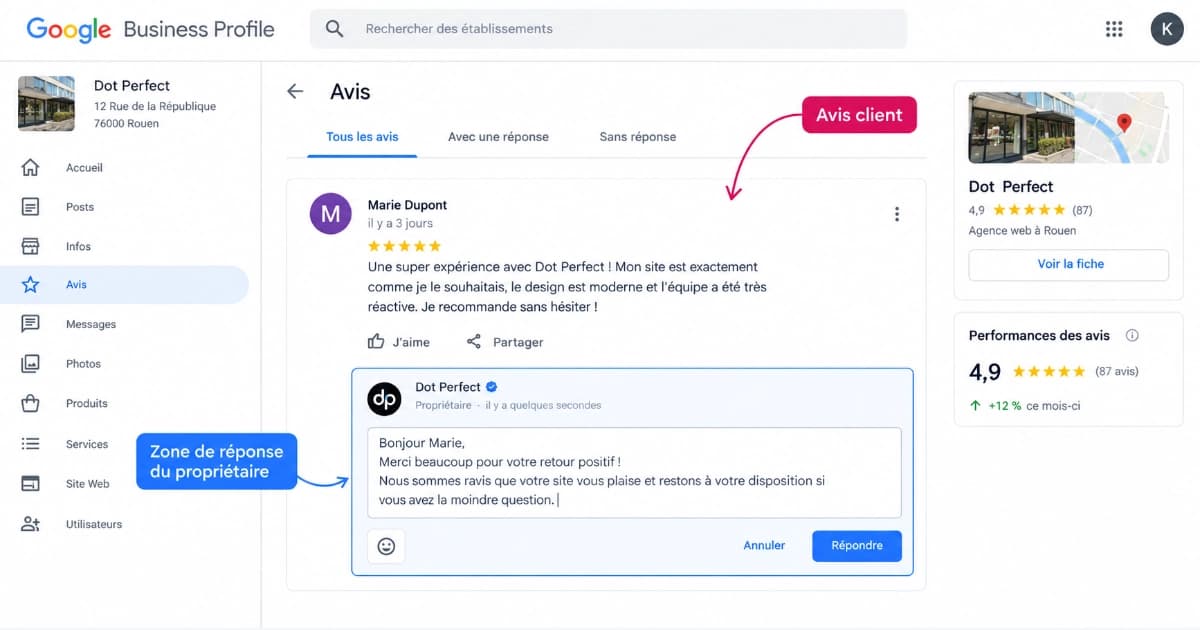
5. Reply to all your reviews, quickly
Reviews directly feed prominence, and your replies are public: they are read by prospects as much as by Google.
- Reply within 48 hours, whether positive or negative.
- On a negative review: acknowledge the fact, state what has been fixed, offer a direct channel. Never argue the substance in public.
- On a positive review: avoid pasting the same reply thirty times.
- Ask for a review after every job, using a direct link rather than "look us up on Google".
Our guide on (EN-SLUG-TO-CONFIRM: how to respond to Google reviews) details the phrasing to avoid, and the (EN-SLUG-TO-CONFIRM: Google review link generator) creates the short link you need to send.
6. Publish posts when you have something to say
Posts keep the profile active and occupy visible space beneath your information. Their effect on ranking is indirect; their effect on the contact rate is real when the content is useful: a time-limited offer, a completed job, a special closure.
One post every week or two is enough. Three empty posts on the same day are not worth one useful post. For available types and reasons for rejection, see our guide on (EN-SLUG-TO-CONFIRM: Google Business Profile posts).
7. Read your insights, and read the right ones
Google's interface provides the number of views, the searches that led to your profile, calls, website clicks, and direction requests.
Two metrics matter more than the rest and are rarely looked at: the share of discovery searches, which tells you if new customers find you without knowing your name, and the interaction rate (actions divided by views). A highly viewed profile with few contacts does not have a ranking problem, it has a content problem.
8. Look at what the profiles above you are doing
This is not espionage, it is reading public fields. For the three profiles ahead of you on your main search query, note down: primary category, review count, average rating, pace of new reviews, number of photos, last published post. Ten minutes is enough to measure the real gap, and most of the time it is not technical: it is a gap in review volume.
9. Fill in the relevant attributes
Attributes are the tags displayed on the profile: wheelchair accessible, contactless payments, parking, online booking, outdoor seating. They depend on your primary category, which is another reason to choose it correctly.
Their impact is not on ranking but on filtering: on Maps, certain attributes are used as sorting criteria. Leaving them blank means disappearing from a filtered list without ever knowing it.
10. Automate what is repetitive, not what is strategic
Steps 1, 2, 3, and 9 are decisions: made once, reviewed twice a year, they cannot be automated. Steps 4, 5, 6, and 7 are routines: they are the first things to drop when business gets busy, and that is where a tool holds up better than a calendar reminder.
📊 Where to start: impact, effort and frequency
Not all ten levers are equal. This table ranks them by real-world effect, to help you decide if you only have one hour ahead of you.
| Lever | Ranking effect | Contact rate effect | Frequency |
|---|---|---|---|
| Primary category | High | Low | Once, annual review |
| Complete information | High | Medium | Once, then on change |
| Reviews and replies | High | High | Ongoing |
| Description | Medium | Medium | Once, annual review |
| Detailed services | Medium | High | Twice a year |
| Recent photos | Indirect | High | Monthly |
| Attributes | Indirect | Medium | Twice a year |
| Posts | Indirect | Medium | Weekly or bi-weekly |
| Insights | None | None (decision aid) | Monthly |
| Competitor watch | None | None (decision aid) | Quarterly |
How to read it: if you only have an hour, spend it on the first three rows. The last two do not change the profile itself, they help you decide where to put your next hour.
🚨 The mistakes that cost the most
Some slow down your progress. Others expose the profile to a restriction and wipe out years of work in one go.
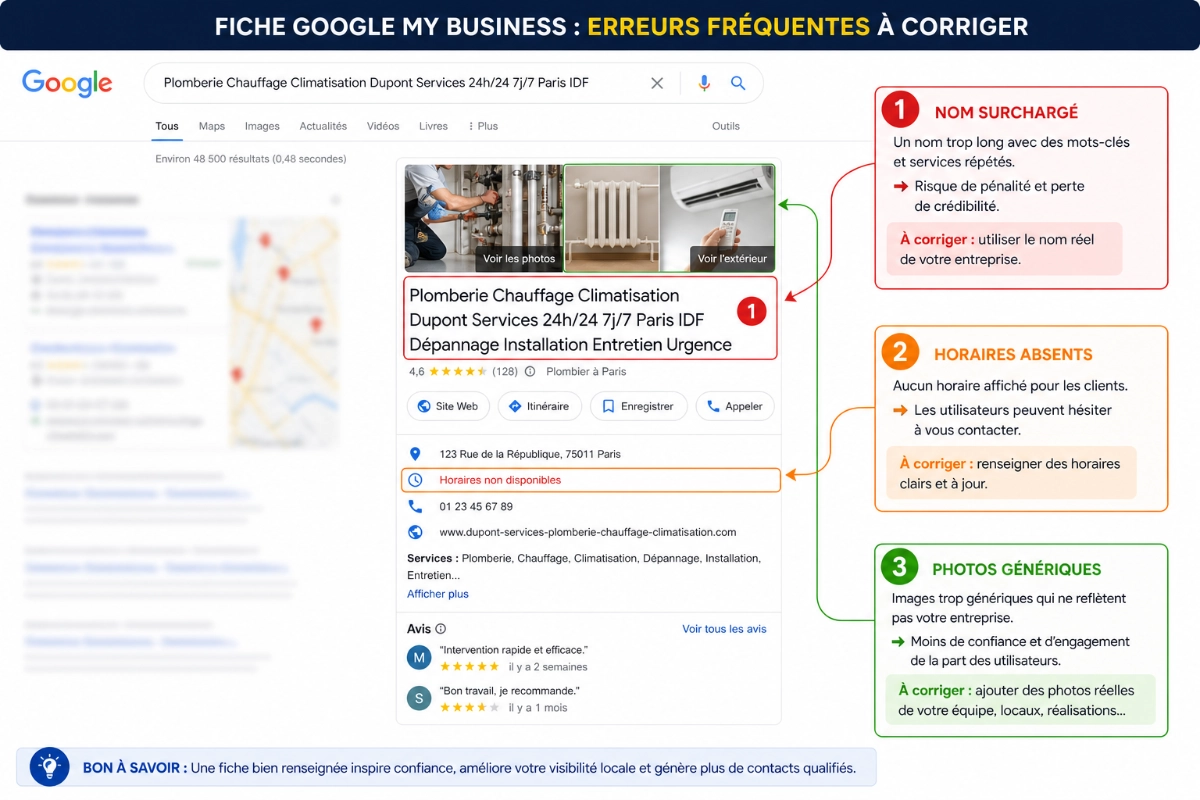
- Adding keywords or a town to your business name. The name must be your real-world signage name.
- Choosing a primary category that is too broad to cast a wider net. The effect achieved is exactly the opposite.
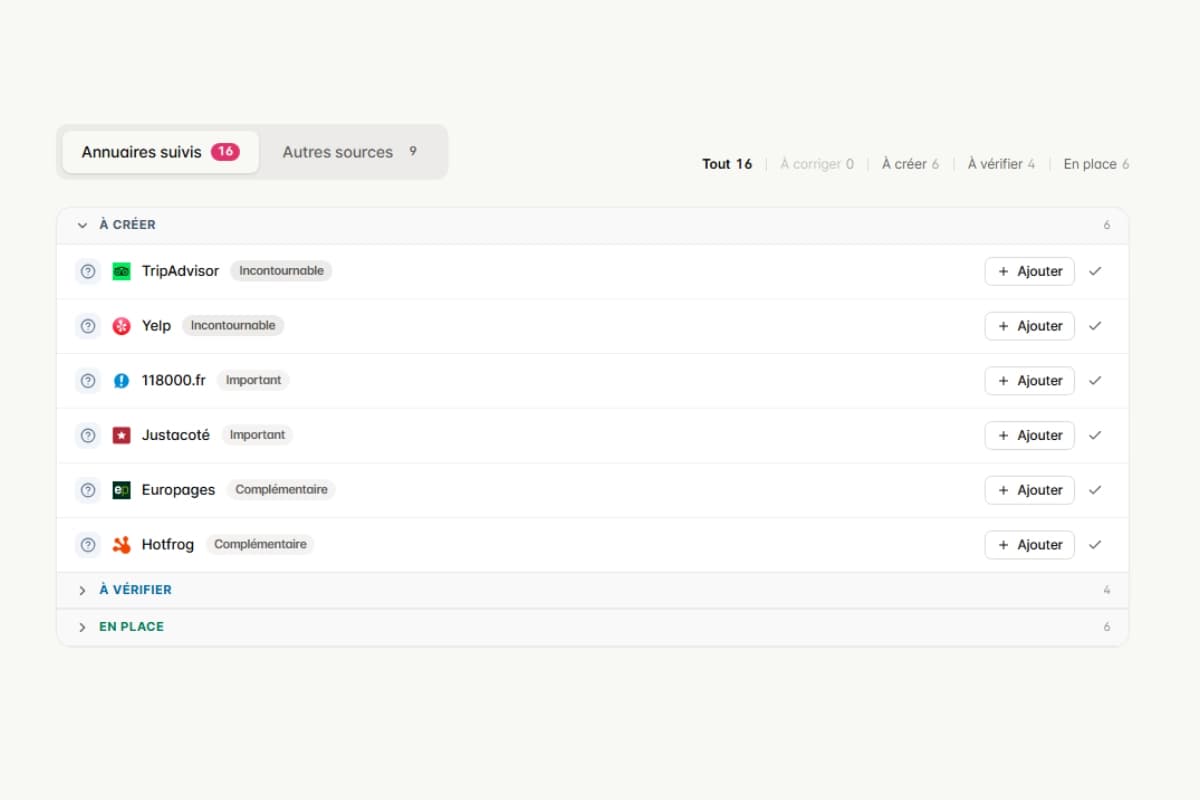
- Leaving a duplicate profile active, often created by a former employee. Two profiles compete with each other and split your reviews.
- Different contact details across platforms. Name, address, and phone number must match exactly on your profile, your website, and directories. The (EN-SLUG-TO-CONFIRM: NAP consistency checker) spots discrepancies in seconds.
- Publishing stock photos. They are easily spotted, do not convert, and can be taken down.
- Filtering reviews before asking for them, meaning only asking satisfied customers, or offering an incentive. These practices violate Google's policies.
- Listing hours you do not keep. This is the number one cause of one-star reviews, and it has nothing to do with the quality of your work.
⚠️ Warning
The business name and reviews are the two areas where Google acts the fastest. A name turned into a keyword slogan can be automatically corrected, and the profile restricted upon repeat offences. Reviews gained in exchange for a discount can be deleted in bulk, dropping your volume and rating overnight. In both cases, the expected gain is far lower than the risk taken.
✍️ Three concrete examples, before and after
These templates are frameworks to adapt, not real client cases. They show the difference between text that just fills a field and text that does its job.
Business Description.
Before: "Reliable and responsive plumbing company. Plumbing, heating, repairs. Plumber Bristol, plumber Clifton, plumber Redland. Free quotes."
After: "[Company Name] covers Bristol and the surrounding area for leak repairs, water heater replacements and bathroom renovations. We work for homeowners and property managers, with a 3-hour emergency response time from Monday to Saturday. Detailed quote before work starts, two-year guarantee on labour."
The second version tells the reader what you do, for whom, where, and in what timeframe.
Reply to a negative review.
Before: "We are surprised by this review, you never reported a problem and our work was done by the book."
After: "Hello [First Name], thank you for flagging this delay on your 14 March appointment. We have since reviewed how we schedule end-of-day slots. I will call you on [number] to find a resolution. [First Name, Role]"
The first defends itself to a reader who was not there. The second shows everyone else how you handle a problem.
Google Post.
Before: "Remember to get your boiler serviced! Contact us."
After: "Gas boiler service: slots available until 30 October. £129 incl. VAT package, statutory safety checks and certificate issued the same day. Book online or on [number]."
A post with a date, a price, and a clear action triggers a contact. A generic post just takes up space.
🤖 What automation changes, and what it will not replace
Keeping on top of all ten steps manually takes two hours the first time, then twenty to thirty minutes a week. It is this last point that usually breaks: the weekly routine rarely survives a busy season. Here is what a tool like Pharelio takes off your plate:
- The (EN-SLUG-TO-CONFIRM: profile audit feature), with over 80 improvement points analysed automatically and an ordered action plan.
- (EN-SLUG-TO-CONFIRM: AI post writing feature) based on your activity, followed by (EN-SLUG-TO-CONFIRM: post scheduling feature) weeks in advance.
- (EN-SLUG-TO-CONFIRM: RSS automation feature), which turns articles published on your website into Google posts hands-free.
- (EN-SLUG-TO-CONFIRM: Photo optimisation feature) with EXIF data, geolocation, and relevant keywords.
- AI review replies, with tone selection and human review before publishing.
- (EN-SLUG-TO-CONFIRM: Competitor analysis feature) and rank tracking, to see where your profile stands without manual comparisons.
What cannot be automated, and this matters: choosing your primary category, ensuring your opening hours are true, and delivering the quality of service that triggers the reviews. A tool provides consistency and systematic checks; it does not manufacture the raw material.
🎯 Where to start based on your profile
- ✅ Retail or physical storefront → special hours, recent exterior and interior photos, filtering attributes (parking, payments, accessibility).
- ✅ Mobile tradesperson (service area) → precise primary category, accurate service area, before-and-after project photos, asking for a review after every job.
- ✅ Professional services → services detailed one by one, booking link, a description that clarifies the exact scope of your practice.
- ✅ Multiple locations → same primary category everywhere, a distinct phone number per location, a unique description for each site.
- ❌ To avoid in all cases → buying reviews, or handing your profile over to an agency without having verified the primary category and business name yourself.
⭐ Our recommendation
Take a baseline reading before touching anything. The Pharelio audit checks your profile against over 80 data points and returns corrections ranked by priority. It is free and requires no credit card; the Pro plan starts at €15 per month billed annually, with a 14-day trial.
🏁 Conclusion
Optimising your Google Business Profile comes down to two phases. The foundational work, done once and reviewed twice a year: category, business information, description, services, attributes. Then, a short and regular routine: photos, reviews, posts, reading insights.
The rest is noise: keywords in the name, thirty towns at the end of the description, statistics copy-pasted from blog to blog. The fields that Google actually documents are the ones that move a profile forward.
Take action:
- Open your profile today and check three things: the primary category, the accuracy of your hours, and the absence of a duplicate profile on Maps.
- Block out a twenty-minute slot in your calendar every week, at the same time, for photos, reviews, and posts.
- Run a comprehensive audit to find out what is missing before spending time randomly.
📚 Sources
- Improve your local ranking on Google, Google Business Profile Help
- Guidelines for representing your business on Google, Google Business Profile Help
- About Google Business Profile, Google Business Profile Help
- Official pages consulted and verified in September 2026.
🔗 Useful resources
- (EN-SLUG-TO-CONFIRM: Google Business Profile audit: the complete method)
- (EN-SLUG-TO-CONFIRM: Google Business Profile photos: formats and mistakes to avoid)
- (EN-SLUG-TO-CONFIRM: Google Business Profile posts: complete guide)
- (EN-SLUG-TO-CONFIRM: How to respond to Google reviews)
- (EN-SLUG-TO-CONFIRM: NAP consistency checker)
- (EN-SLUG-TO-CONFIRM: Google Business Profile description analyser)
- (EN-SLUG-TO-CONFIRM: How it works)
- (EN-SLUG-TO-CONFIRM: Pricing and plans)
❓ FAQ
How long does it take to see an impact on my visibility?
Expect several weeks. Information updates are processed quickly once verified, but the effect on ranking depends on local competition and prominence, which builds over time. Nobody can guarantee a timeframe.
Do I really need to publish a post every week?
No. Consistency matters more than frequency. One useful post every two weeks is better than four empty posts in a month. Publish when you have an offer, company news, or practical information to share.
Can I add my town or profession to my business name?
No, unless it is actually on your real-world shop sign. The business name must match the name used in the real world. This is one of the violations Google corrects the fastest, and repeat offences expose you to profile restriction.
What should I do about an obviously fake review?
Report it via the interface, then reply publicly and factually, without accusing the author. Reporting does not always succeed, and a calm reply protects your reputation better than a deleted review. Continue to solicit genuine reviews in the meantime.
Local SEO agency or profile management tool: which to choose?
A tool if you want to keep control and the main bottleneck is time or method. An agency, or a done-for-you service, if absolutely no one in your team will stick to the twenty-minute weekly routine. The deciding factor is not the budget, it is knowing who will maintain the habit.
Can a profile with a hidden address rank well?
Yes. Businesses that travel to their customers are eligible using a service area and a hidden address. However, distance is calculated from the central point associated with your business: expanding your declared service area does not replace having an actual physical presence in the target sector.
Ready to put this into practice?
Create your free Pharelio account and optimize your Google listing in minutes.
Start for freeNo credit card · No commitment

Kévin Geiger
Founder of Pharelio
Kévin Geiger has been helping French small and local businesses with their Google listing visibility for several years. He writes about local SEO starting from what Google actually controls, not off-the-shelf tips.
See his LinkedIn profile