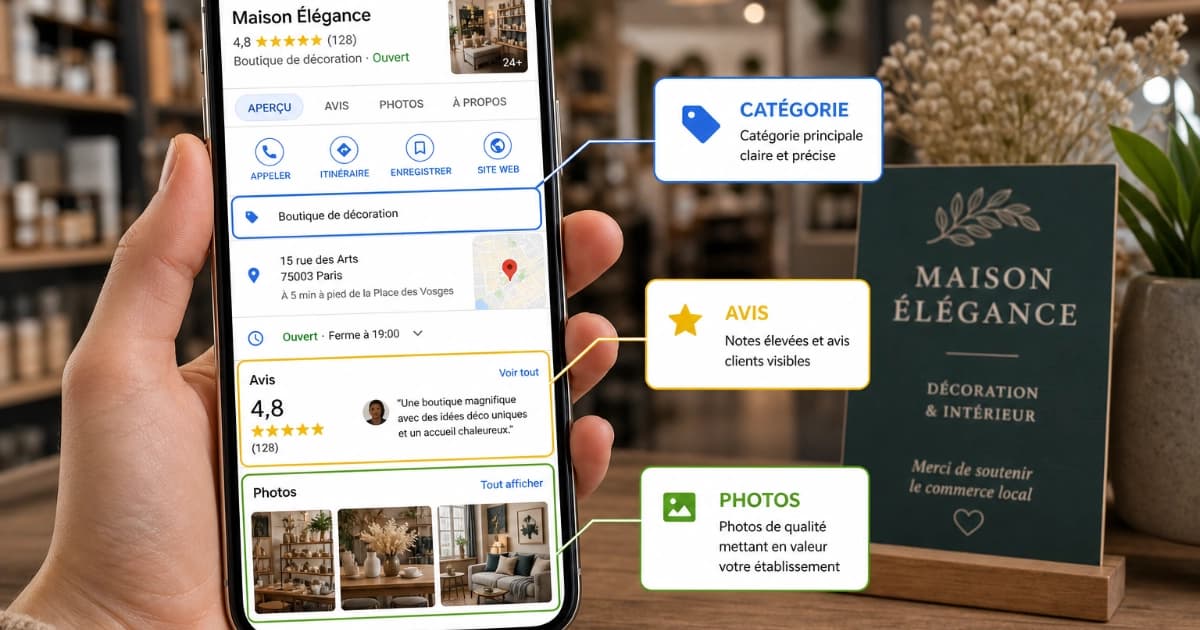
You added three photos to your Google Business Profile the day you set it up, and nothing since. Meanwhile, the competitor down the street shows their storefront from three angles, their team at work, and their latest projects. On Google Maps, that's often the first thing a customer compares, before they even read the reviews.
Photos are one of the few parts of your profile you fully control. What matters is publishing the right ones, in the right format, without wasting time on tricks that don't hold up. This guide sticks to what Google actually documents (formats, expected photo types, review status, removal reasons), settles the debate over EXIF data, and gives you a publishing rhythm you can actually keep up all year.
💡 The essentials in 30 seconds
- Google recommends at least three photos per relevant type: exterior, interior, products, work in progress, team.
- A real photo taken on-site beats an edited image, a text-heavy graphic, or a stock photo.
- Consistency matters more than volume: a few photos every month, all year, rather than fifty at once.
- Google accepts JPG or PNG, 10 KB to 5 MB, ideally at 720 x 720 px.
- Adding GPS coordinates to a photo's EXIF data has no proven effect on local ranking.
- Google can replace your cover photo with a customer's photo if it judges yours low quality.
📈 Why Photos Matter, for Google and for Your Customers
Google ranks local results using three factors: relevance, distance, and prominence. For relevance, its guidance is to provide complete and detailed business information, and adding photos and videos is part of its official advice for improving local ranking. Google does not publish a specific weight for photos, though. Be wary of anyone who gives you one.
The most widely cited figure on this topic comes from a BrightLocal study, first published in 2019 on data from late 2017 and late 2018: profiles with more than 100 photos received 520% more calls and 2,717% more direction requests than average. The study itself notes these businesses may simply belong to industries where customers photograph more, or may just be better at managing their profile overall. That's a correlation, not a recipe. Chasing 100 photos to hit a number makes no sense; covering everything a customer wants to see before visiting does.
On the customer side, photos do something more concrete:
- Reassure people the business is real and in the condition shown.
- Help customers recognize the storefront when they arrive.
- Show the quality of work before a customer requests a quote.
- Break the tie between two profiles with similar reviews.
If you're starting your profile from scratch, begin with our complete guide to optimizing your Google Business Profile in 2026, then come back here for the visual side.
📐 Format, Size, and Timing: Google's Official Rules
The technical requirements are published in Google Business Profile Help. A photo that doesn't meet them gets rejected or displays poorly.
- Format: JPG or PNG. HEIC, the default on iPhone, isn't on the list: export as JPG.
- File size: between 10 KB and 5 MB.
- Recommended resolution: 720 px tall, 720 px wide.
- Minimum resolution: 250 px tall, 250 px wide.
- Quality: in focus, well lit, no significant alterations or excessive filters or AI. The image should represent reality.
- Videos: up to 30 seconds, up to 75 MB, 720p resolution or higher.
- Verified profile required: photos don't show up until your profile is verified.
- Review time: up to 24 to 48 hours after upload.
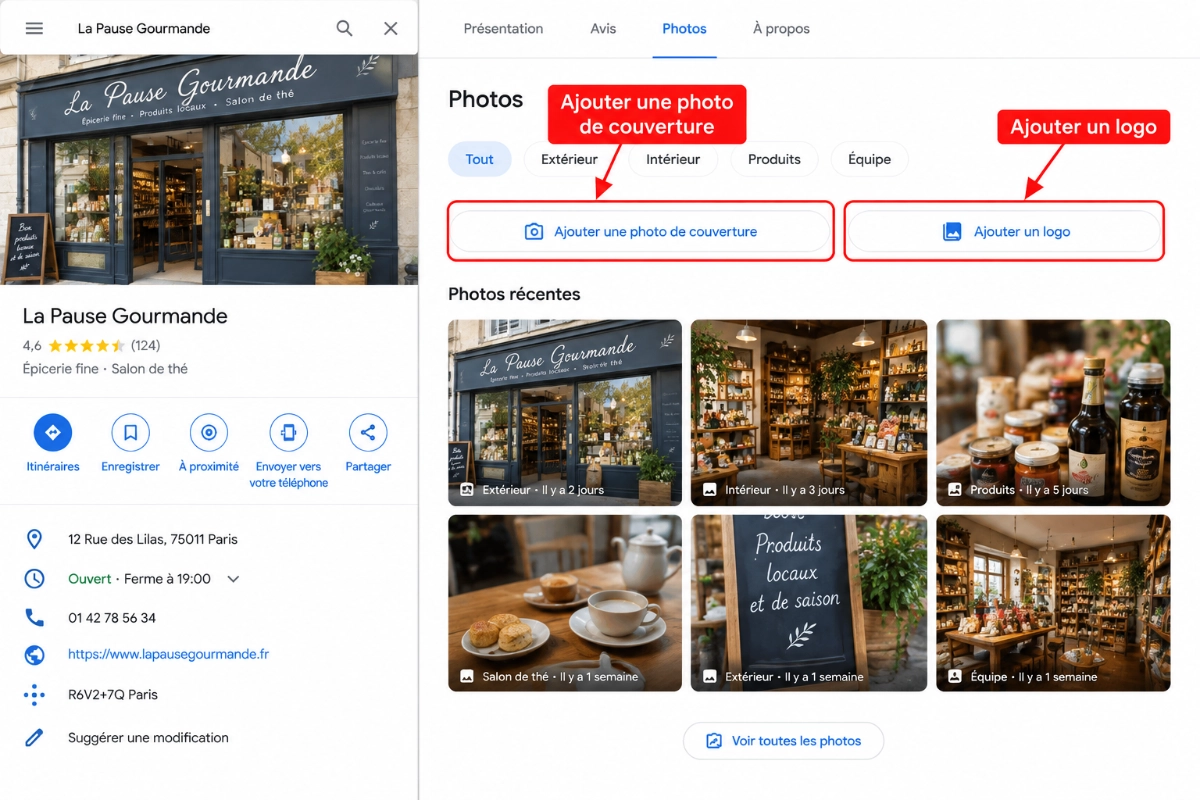
Logo and Cover Photo: Two Special Cases
The logo displays on profiles that have their basic information filled in: name, address, categories, phone number, and hours. If it's missing, check those fields first.
The cover photo is never guaranteed. If Google judges it low quality, or not representative, it may show a customer's photo instead. Pick a bright, wide-framed image that clearly shows the place or the business.
The Three Statuses of an Uploaded Photo
After upload, each piece of media goes through a status visible in your account:
- Pending: still processing, or the profile isn't verified yet. Not visible to customers.
- Not approved: flagged for violating Google's policies. Not visible to customers.
- Live: showing on Search and Maps.
📸 What Photos to Publish, and How Many
Google publishes a list of photo types, with a recommended minimum for each. It's the most reliable baseline for spotting what's missing from your profile.
| Photo type | What it should show | Google's suggested minimum | Mostly relevant to |
|---|---|---|---|
| Exterior | The storefront from each direction customers might approach, at different times of day | 3 | Any customer-facing business |
| Interior | What a customer actually sees once inside, the ambiance, the layout | 3 | Shops, restaurants, practices |
| Products | Your most popular items, evenly lit | 3 | Retail |
| At work | Your team delivering your services, including specialties | 3 | Tradespeople, service businesses |
| Team | Owners and staff, in a less formal setting | 3 | All businesses |
| Food & drink | Your most ordered items, well lit | 3 | Restaurants |
| Common areas | Spa, gym, breakfast room | 1 per area | Hospitality |
| Rooms | Each room type, as the guest will find it | 3 | Hospitality |
For most shops and tradespeople, the relevant types add up to at least a dozen photos. That's a baseline to hit quickly, not a ceiling. A Google Business Profile audit flags empty photo types in a few minutes.
ℹ️ Good to know
Photographing customers, even happy ones, requires their consent, and the rules vary by country. Ask for permission, or frame the work itself rather than the person. Photos your customers upload themselves can't be removed from your own dashboard: you can only report them to Google if they violate its policies.
🧭 EXIF Data and Geotagging: What's Proven, What Isn't
EXIF data is the metadata a device records in every photo file: date, camera model, settings, and, if location is enabled, the GPS coordinates of where the photo was taken. One idea has circulated for years: adding your coordinates and keywords to this metadata sends a local ranking signal to Google. The previous version of this article repeated that claim. We're correcting it.
Here's what's actually established:
- Google doesn't document using EXIF data to rank profiles anywhere.
- Photos downloaded from a Google Business Profile no longer contain their metadata, something anyone can verify.
- A ten-week test across 27 businesses, published by Search Engine Land in March 2025, found no positive ranking effect from geotagging, and even a decline for some city-name searches.
- In the Local Search Ranking Factors survey, local SEO practitioners rank photo geotagging as the top local SEO myth.
Our position is simple: don't pay for a photo "geotagging" service, and don't spend time editing metadata hoping to climb rankings. It isn't harmful, it's just useless as a ranking lever.
What actually matters in the file is more down to earth: a photo genuinely taken on-site, at the right format, well framed and well exposed. Google explicitly asks for media created at the location itself.
🗓️ How Often to Post Photos to Your Google Business Profile
Google sets no posting frequency and documents no bonus tied to rhythm. It does note that your most recent media appears first on your profile. In other words, your latest photo is often the first impression you give. A profile whose newest photo is three years old tells the customer nobody's minding it.
Consistency matters more than volume. The rhythms below are our field recommendations, not Google rules:
- Restaurant, café, shop with a changing window display: 1 to 2 photos a week, as dishes, stock, and displays change.
- Tradesperson, service business: 2 to 4 photos a month, as jobs wrap up.
- Professional practice, office: a few photos a quarter, plus an update whenever something changes (renovation, new signage, new partner).
- Any business: replace photos immediately once the storefront, layout, or team changes.
Avoid a burst of forty photos followed by six months of silence: a monthly photo session with staggered publishing works better. To measure the effect, track calls, clicks, and direction requests in your profile's insights. Photos attached to posts follow a different logic, covered in our Google Business Profile posts guide.
🖼️ Examples of Good Photos, by Business Type
The table above covers the list. Here's what a good photo actually looks like, by the most common business types we work with.
Tradespeople
- Photograph the finished job in a wide shot, then a close-up of a finishing detail.
- Show the team on-site, in uniform, with an identifiable vehicle.
- Publish before-and-after shots from the same angle, as two separate photos: Google discourages collages.
Restaurants, Cafés, Bakeries
- Photograph your best-selling dishes in natural light, full plate in frame.
- Show the dining room during service, not empty at 3 PM.
- Publish the storefront in daylight and at night, plus the terrace in season.
Restaurant-specific details (menus, split hours, photo freshness) are covered in our Google Business Profile audit for restaurants.
Retail
- Show the storefront, the shelves, your top products, and the counter.
- Photograph what makes visiting easier: parking, step-free entry, accessible access.
Professional Practices, Offices
- Photograph the storefront with your sign and the building entrance.
- Add the waiting room and the office, tidy and well lit.
- Publish a portrait of the practitioner or team: it reassures before a first appointment.
- Never show an identifiable patient or client.
🚫 Mistakes That Get Photos Rejected or Ignored
Most ineffective photos aren't rejected: they're simply ignored by customers, or removed by Google for low quality. The most common mistakes:
- Stock photos, screenshots, GIFs, or collages. Google asks for media you captured yourself.
- Text, borders, or logos overlaid on every photo. Google discourages these additions.
- Heavy filters and AI retouching. The image should represent reality, or the customer is disappointed on arrival.
- Dark, blurry, or tilted photos. Google explicitly calls these out.
- Selfies and photos centered on a person. The place or the work should stay the main subject.
- Outdated photos. An old storefront or an old team makes returning customers unsure they've got the right place.
⚠️ Heads up
Under Google Maps' user-generated content guidelines, low-quality media can be removed, and quality-based removals can't be appealed. It's better not to publish a mediocre photo at all than to publish for the sake of publishing.
🛠️ How Pharelio's Photo Automation Works
The method above works well done by hand. The hard part isn't understanding it, it's keeping it up for twelve months once the workload picks up. That's exactly what Photo Optimization in Pharelio's Pro plan handles.
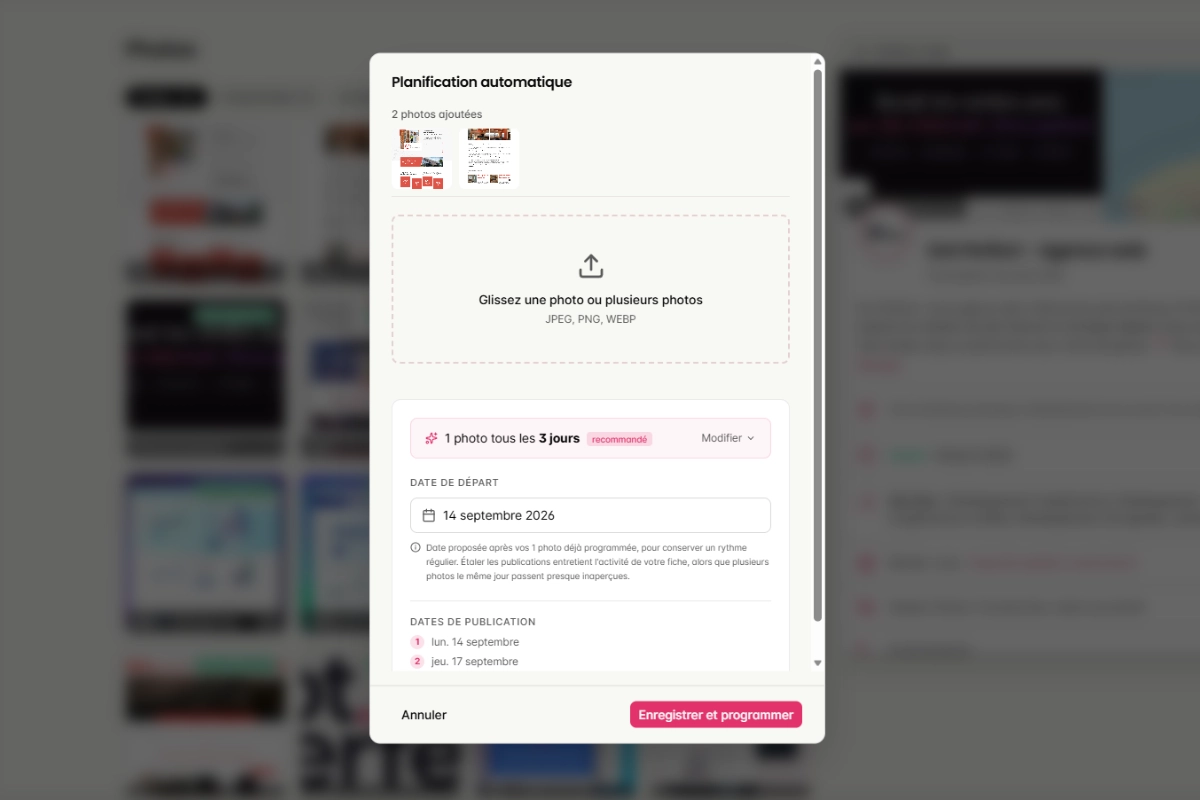
The process runs in four steps:
- You upload your photos: storefront, interior, products, team, or completed work, all at once.
- The tool prepares each file: it fills in EXIF metadata, including your business location and descriptive keywords.
- It flags the photo types missing from your profile, to cover the list Google expects.
- It schedules publishing to spread out your uploads and keep a steady rhythm without you having to think about it.
To stay consistent with the section above: Pharelio fills in EXIF data to keep your files complete and consistent, not because it moves your ranking. We won't sell it to you as a ranking lever. The real value of automation is elsewhere: never missing a publishing cycle, covering every photo type, and spreading uploads out instead of dumping them all at once.
🎯 DIY or Automate: Which Fits You
- ✅ You manage one profile and remember to post → Google's interface is enough. Follow the type table and your industry's rhythm.
- ✅ You forget the profile once business picks up → block out a monthly photo session and let a scheduling tool spread out the uploads.
- ✅ You manage several locations → Google offers bulk photo upload via spreadsheet from 10 locations up; below that, a multi-profile tool saves time on regular updates.
- ✅ You don't have time for any of this → hand off profile management to someone who posts for you.
- ❌ Buying a photo "geotagging" service → no proven ranking effect, so it's money wasted.
- ❌ Publishing a hundred photos at once to hit a number → the profile looks stale again within weeks.
⭐ Our recommendation
Start with Pharelio's free audit: over 80 points checked, including your photos, with a Google sign-in and no credit card. If consistency is your weak point, the Pro plan prepares and schedules your photos for you, with a 14-day free trial and no credit card required.
🏁 Conclusion: What to Remember
Google Business Profile photos aren't a secret lever: they're proof. They show the customer what they'll find when they arrive, and they round out a profile Google is trying to make useful. The rules that matter are public and simple: real photos taken on-site, at the right format, covering every type relevant to your business.
The rest comes down to consistency. Time spent editing metadata is better spent photographing your latest finished job.
Take action:
- Today, open your profile on Google Maps, sort your photos by type, and spot the empty types and outdated shots.
- This week, run a 30-minute photo session to fill the gaps: storefront from several angles, interior, team, three completed jobs.
- Then set a rhythm that fits your business and schedule it, by hand or with a tool.
📚 Sources
Sources checked and verified in September 2026.
- Google, Google Business Profile Help, Tips for business-specific photos on your Business Profile
- Google, Google Business Profile Help, Manage your Business Profile photos & videos
- Google, Maps User Generated Content Policy, Tips for posting media to Maps
- Google, Google Business Profile Help, Understand factors that determine local ranking
- BrightLocal, Google My Business Insights Study
- Whitespark, Geotagging Photos is a Local SEO Myth
- Search Engine Land, How geotagging photos affects Google Business Profile rank: Study, March 2025
📚 Related Resources
❓ FAQ
What's the right size for a Google Business Profile photo?
Google's recommended size is 720 x 720 px, with a minimum of 250 x 250 px. The file must be JPG or PNG and weigh between 10 KB and 5 MB. Google doesn't publish separate dimensions for the cover photo and the logo: apply the same requirements, subject centered.
Why isn't my photo showing on my profile?
Usually it's still under review: display can take 24 to 48 hours. Check its status: "Pending" means still processing or an unverified profile, "Not approved" means it was rejected for policy reasons, "Live" means it's visible. If it's still missing, check it isn't a duplicate.
Can I remove a photo a customer added?
Not directly. You can delete your own photos, but customer photos have to be reported to Google, which decides whether to remove them for policy violations. Against an unflattering customer photo, the best response is still publishing your own regularly.
Professional photographer or smartphone?
A smartphone is enough in most cases, with good light and a sharp image. A photographer is worth it for the cover photo and interiors where ambiance sells, like a restaurant. Either way, skip heavy retouching.
Photos in the Photos tab or in posts?
Both, since they serve different purposes. The Photos tab is your permanent showcase. Posts carry news, an offer, or an event, with text and a call-to-action button.
Does geotagging photos improve local ranking?
No, nothing supports that. Google doesn't document any use of EXIF data for ranking, and published tests found no positive effect. Focus on real photos, taken on-site and published consistently.
Ready to put this into practice?
Create your free Pharelio account and optimize your Google listing in minutes.
Start for freeNo credit card · No commitment

Kévin Geiger
Founder of Pharelio
Kévin Geiger has been helping French small and local businesses with their Google listing visibility for several years. He writes about local SEO starting from what Google actually controls, not off-the-shelf tips.
See his LinkedIn profile